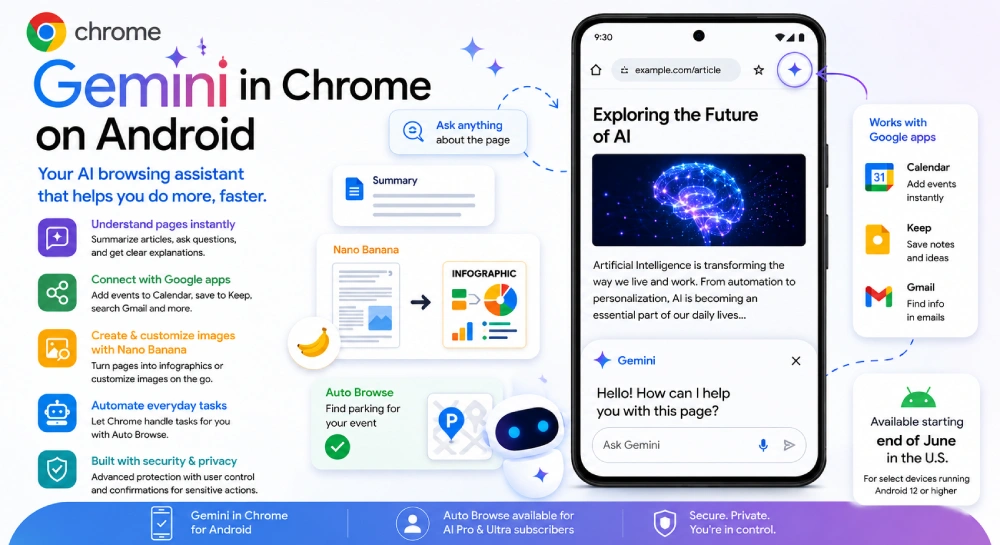
Google’s pushing Chrome on Android into new territory by building Gemini, its AI assistant, right into the mobile browser. Instead of just letting you read and scroll, Chrome now steps in as your sidekick—summarizing, automating, generating visuals, and generally making web browsing less of a chore.
If you’re in the U.S. and using an Android 12 device or newer, you’ll start seeing these features pop up sometime after the end of June. Not everyone gets it at once (of course), but it’s on its way.
So, what’s Gemini actually do in Chrome?
Picture this: you’re reading something long, dense, or just confusing. Instead of hopping around to other apps or hunting for answers, you hit the Gemini icon right there in Chrome. The assistant shows up at the bottom of your screen, ready to help with stuff like:
- Summarizing articles so you don’t have to slog through them.
- Breaking down tricky topics that’d otherwise require a Google rabbit hole.
- Answering questions about whatever you’re reading, right on the spot.
- Creating visuals (because sometimes you just need a picture to get it).
- Handling little tasks without switching apps.
- Tying in with familiar Google tools—Gmail, Keep, Calendar—and working with your existing stuff.
Basically, the idea is to have an AI assistant that does more than chat: it helps you finish things, not just ask about them.
Here’s a closer look at how it actually works:
1. AI That Gets What You’re Looking At
Gemini understands what’s on your screen. Need a quick recap of a giant article? Just ask. Trying to understand something complicated? Get a simpler version in one tap. Doing research? Ask all your follow-up questions without jumping between apps. It’s all right there.
2. Smarter Google Integration
Imagine adding events to Calendar, pulling info from Gmail, or dumping shopping lists into Keep—without leaving Chrome. Gemini connects the dots for you inside the browser, which means less busywork.
3. Personalized Answers (If You Want Them)
You can let Gemini tailor its responses to what you like, what you’re into, and what you look up most often. Of course, you’re in charge of privacy settings, so nothing’s changed there unless you want it to.
What About Images? Enter: Nano Banana
Google’s added a feature with a name you won’t forget: “Nano Banana.” Weird name, but it means you can actually create and edit images in Chrome while you’re browsing. A few ways people could use it:
- Students can turn dry web pages into shareable infographics.
- Hunting for an apartment? Ask the AI to add a couch to an empty room photo—see how it would look.
- Need complex info broken down? Get an instant visual guide.
- Bloggers, designers, anyone making content—it’s a new shortcut for visuals right where you work.
Welcome to Auto Browse—Let Chrome Do the Boring Stuff
This one’s big. With Auto Browse, Chrome can actually take care of little tasks for you. It’s one more step toward AI that does, not just says.
For example:
- Bought event tickets and forgot to reserve parking? Chrome can scan your confirmation, search for nearby spots, and even assist with the booking.
- Need to update recurring deliveries or manage a pet food subscription? Let Chrome handle the routine steps.
- Shopping online gets easier, since repetitive changes and orders can all happen automatically.
You’ll seriously cut down on those tiny tasks that eat up your time.
Staying Secure and In Control
Obviously, Google’s a bit under the spotlight when it comes to security and privacy. They say Gemini in Chrome uses the same, solid protections as desktop Chrome. That means you’re covered against shady attacks and harmful AI tricks.
Auto Browse won’t go rogue—if something sensitive is about to happen, like buying something or posting for you, you’ll get asked first. You don’t lose control to the AI.
Who Gets It, and When?
- You need Android 12 or higher, plus a supported phone, and you have to be in the U.S. at launch.
- The rollout kicks off late June.
- The fancier stuff (like Auto Browse) is reserved for Google AI Pro and Ultra subscribers.
Why Should You Care?
For students: study summaries in seconds, instant visual notes, easier research—no more tab overload.
For professionals: faster emails, workflow automation, more stuff done without leaving the browser.
For creators: instant infographics, on-the-spot image tweaks, and research help built in.
For everyone else: simpler shopping, fewer repetitive tasks, less wasted time jumping between apps.
The Bottom Line
This update is a real step toward making AI part of everything you do on your phone—not stuck in a separate app or chatbot. Now, the browser actually understands what you’re doing, jumps ahead of your next move, and helps get tasks done.
Google’s putting down its marker in the AI assistant race, and it’s using Chrome to do it.
If you’re already in the Google world—and lots of us are—this update makes your browsing feel quicker, smarter, and less stressful. And if Google keeps expanding it beyond the U.S. and adds support for more devices, Gemini in Chrome could end up being one of the most useful AI features to hit Android in years.
General Disclaimer: The articles published on Milestone Journey are gathered from various research materials, code repositories, and documentation sources. While we strive to update our core codebase regularly, technical specifications may change over time. Content is provided for informational and educational purposes only.
Discussion (0)
Leave a Reply
No confirmed discussions contributed yet. Be the first to start the thread!